Kakao Account Guide: How to Create, Use, and Manage Your Kakao Account Effectively
If you have a plan to connect with friends in South Korea, explore Korean entertainment platforms, or access essential services like KakaoTalk, KakaoPay, or KakaoStory, having a Kakao Account is your gateway to Korea’s most popular digital ecosystem. A Kakao Account isn’t just for chatting; it’s a unified login that links you to various applications under the Kakao umbrella.
From communication to payments, content, and even business tools, a Kakao Account makes navigating Korea’s digital world easy. In this guide, we’ll walk you through everything you need to know about creating, managing, and making the most of your Kakao Account.
What Is a Kakao Account?
A Kakao Account is a unified login system that allows users to access and manage various Kakao services using a single set of credentials, typically an email address and password. It is the central hub for all services developed by Kakao Corporation, one of South Korea’s leading tech companies.
What makes a Kakao Account particularly valuable is the single sign-on (SSO) functionality. Instead of juggling multiple usernames and passwords for different services, users only need to create and manage one account to access the full suite of Kakao’s offerings. This simplifies both personal and professional use across the Kakao ecosystem.
It’s important to note that a Kakao Account differs from a KakaoTalk ID. While a KakaoTalk ID is used specifically for messaging and can be customized for user privacy and searchability, your Kakao Account is your master login for all Kakao services. Without a Kakao Account, you can’t fully utilize the integrated features across Kakao’s platforms.
Whether you’re a Korean resident, an international user, or a business aiming to reach Korean consumers, a Kakao Account is essential for participation in Korea’s digitally connected lifestyle.
Why You Need a Kakao Account
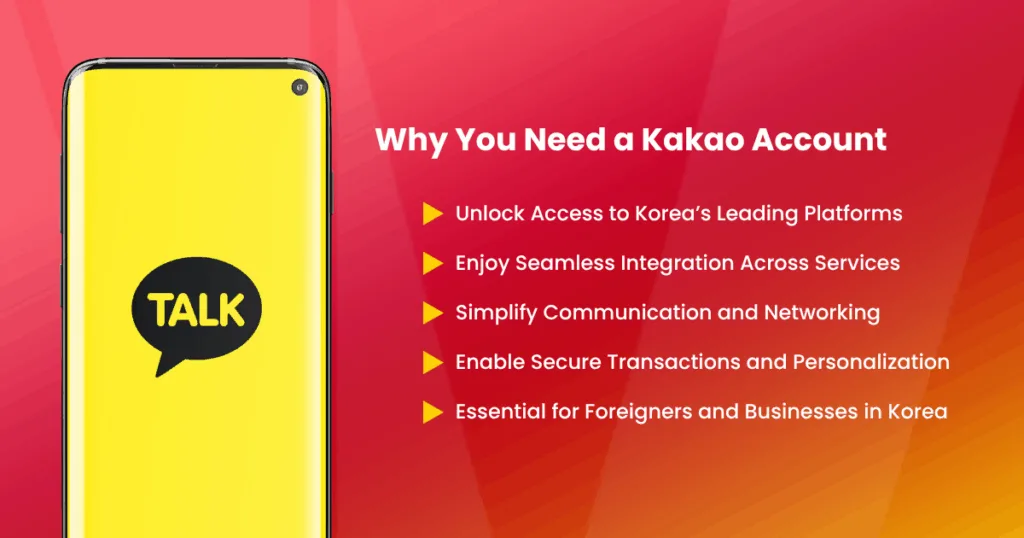
A Kakao Account is more than just a login; it’s your digital passport to South Korea’s most widely used apps and services. Whether you’re an individual looking to stay connected or a business entering the Korean market, a Kakao Account provides seamless access, enhanced functionality, and integrated tools that are hard to ignore. Here’s why having one is essential:
Unlock Access to Korea’s Leading Platforms
From chatting on KakaoTalk to streaming music on Melon, calling a ride via Kakao T, or navigating the city with KakaoMap, your Kakao Account connects you to nearly every aspect of daily life in Korea. Kakao’s apps are deeply integrated into Korean society, and your account is the key.
Enjoy Seamless Integration Across Services
Once logged in, your Kakao Account automatically connects you across multiple services without re-entering credentials. For example, you can use your KakaoTalk login to make purchases via KakaoPay, manage your schedule through Kakao Calendar, or post updates on KakaoStory without creating separate profiles or accounts.
Simplify Communication and Networking
KakaoTalk, Korea’s most popular messaging app, requires a Kakao Account to back up data, sync contacts across devices, and secure your chat history. For influencers, professionals, and marketers, this account is vital for Kakao Channel management and coordinating with followers or customers efficiently.
Enable Secure Transactions and Personalization
Your Kakao Account enables personalized services like shopping suggestions, payment history, and content recommendations. Features like KakaoPay, KakaoGift, and KakaoFriends Store ensure a smooth, secure, and convenient online experience tailored to your preferences.
Essential for Foreigners and Businesses in Korea
If you’re living in South Korea or targeting Korean consumers, having a Kakao Account is practically non-negotiable. It allows foreigners to navigate local services, while businesses can access Kakao for Business tools to advertise, engage customers, and grow their presence in the Korean digital market.
How to Create a Kakao Account
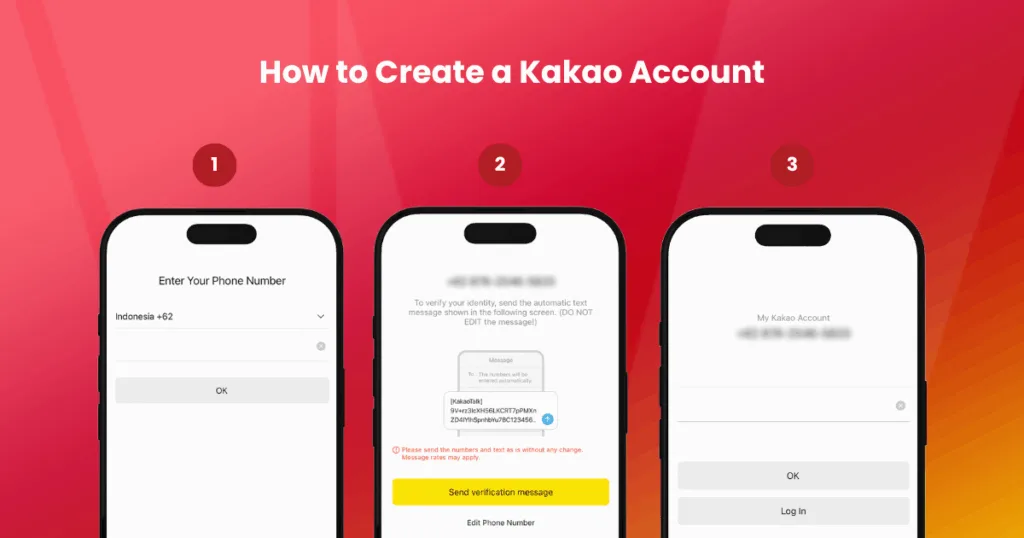
Creating a Kakao Account is a simple process that opens the door to Korea’s most popular digital platforms. Whether using KakaoTalk for messaging, KakaoPay for payments, or KakaoStory to share your moments, everything begins with a single account. Below is a step-by-step guide to help you get started, whether you’re in Korea or signing up from abroad.
Step 1: Choose Your Platform (Mobile or Desktop)
You can create a Kakao Account using the KakaoTalk mobile app or directly through the Kakao website on a browser.
- Mobile users: Download the KakaoTalk app from the Google Play Store or the Apple App Store.
- Desktop users: Visit accounts.kakao.com and click on “Sign Up.”
Step 2: Provide Your Basic Information
To register, you’ll need to enter the following details:
- A valid email address (used as your login ID)
- A secure password
- Your full name
- Your birthdate
- Your country of residence
Please use an email you have regular access to. This email will be used for verification and recovery purposes.
If you’re registering through a mobile phone, you must first add your phone number and country code. The rest of the information will remain the same.
Step 3: Phone Number Verification
Kakao requires phone number verification to complete the sign-up process. You’ll receive a one-time verification code via SMS, which you must enter to verify your identity.
Tip for international users: Kakao supports many international phone numbers, but if your number isn’t accepted, try switching to a different platform (web vs. app) or use a Korean SIM card if available.
Step 4: Agree to the Terms and Conditions
Before completing your registration, you’ll be asked to agree to Kakao’s Terms of Service and Privacy Policy. Some optional services (like marketing emails) can be skipped, but agreeing to the core terms is mandatory.
Step 5: Confirm Your Email (Optional but Recommended)
After you register, Kakao may prompt you to confirm your email address. Clicking the link in the confirmation email helps strengthen your account security and improves access to recovery options.
Step 6: Start Exploring Kakao Services
Once registered, your Kakao Account is ready across all Kakao services. You can now:
- Log in to KakaoTalk and sync your contacts
- Access services like KakaoPay, KakaoStory, and Melon
- Set up a KakaoTalk Channel for your business or content
Setting Up and Customizing Your Kakao Account
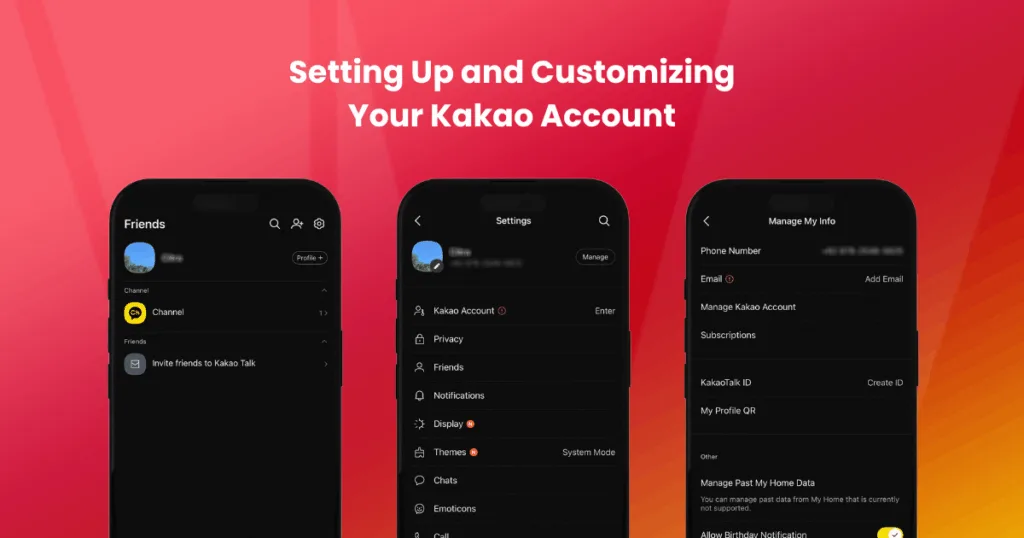
Once you’ve created your Kakao Account, the next step is personalizing it for convenience, security, and a better user experience across Kakao’s connected services. Whether you’re using KakaoTalk for personal communication, KakaoStory to share content, or other Kakao services for business or lifestyle needs, properly setting up your account ensures smoother navigation and maximum control. Here’s how to make your Kakao Account truly yours:
Add or Update Your Profile Information
After signing in, you can personalize your account profile with the following:
- Profile picture: Upload an image that reflects your personality or brand.
- Nickname: Choose a nickname that will be visible to your friends or followers across services like KakaoTalk and KakaoStory.
- Status message: Set a short message to let others know what you’re up to, commonly used in KakaoTalk.
These details help you manage how others see you within the Kakao ecosystem.
Link Your Phone Number and Email Address
For added security and functionality:
- Ensure that your mobile number is linked to your account. This allows you to receive alerts, recover your account, and verify new devices.
- Keep your email address updated, as it’s used for login, password recovery, and service notifications.
You can manage these from the Account Settings menu under “Personal Info.”
Set Your Language and Notification Preferences
Kakao services are available in multiple languages. To switch:
- Go to Settings > General > Language
- Choose your preferred language (Korean, English, Japanese, etc.)
You can also manage push notifications, chat alerts, and marketing messages in the same settings area to reduce distractions or unwanted messages.
Manage Privacy and Visibility Settings
Your Kakao Account gives you complete control over your digital presence:
- Friend recommendations: Choose whether others can find you by phone number or KakaoTalk ID.
- Profile visibility: Limit who can see your profile details and posts on KakaoStory.
- Chat backup: Enable backups to preserve your KakaoTalk chat history when switching devices.
Visit Settings > Privacy to review and adjust each option according to your comfort level.
Connect to Other Kakao Services
Once your basic account is set up, you can easily connect it to other apps under the Kakao umbrella, such as:
- KakaoPay – for secure mobile payments and money transfers
- Kakao T – to hail rides and manage transportation
- Kakao Channel – to create a business or influencer presence
You’ll often be prompted to grant permissions or link your account the first time you use each service, ensuring seamless integration.
Managing and Recovering Your Kakao Account
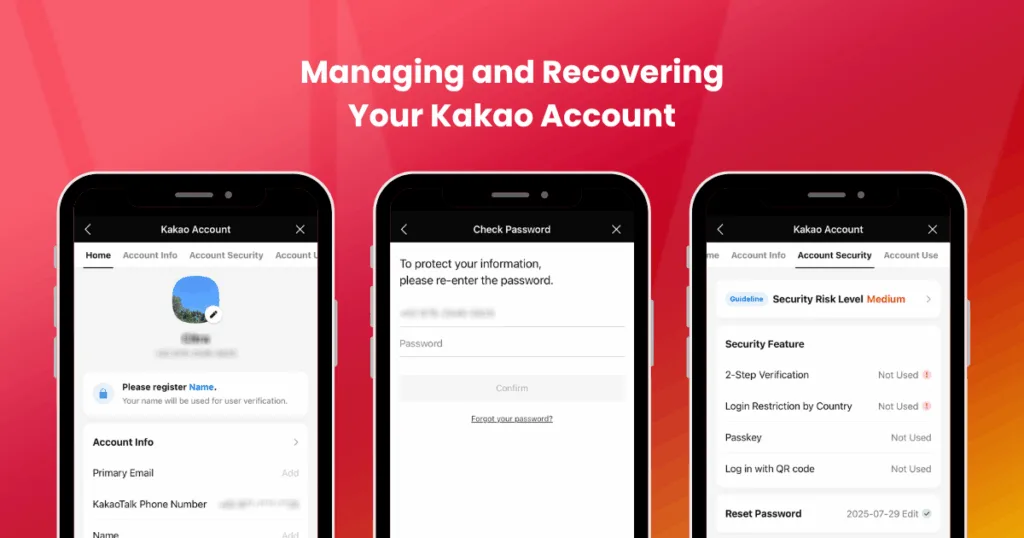
Your Kakao Account is your central login for multiple Kakao services, so managing it effectively is essential for maintaining access, protecting personal data, and ensuring uninterrupted service. Whether updating your information, switching devices, or recovering a forgotten password, this section covers the key actions and recovery methods every user should know.
How to Change Your Password or Email Address
For security or convenience, please update your account credentials occasionally. Here’s how:
- Change your password:
-
- Log in to accounts.kakao.com.
-
- Navigate to Account Settings > Security.
-
- Select Change Password, enter your current password, then your new one.
-
- Confirm the update.
- Change your email:
-
- Go to Settings > Personal Info.
-
- Update your email address.
-
- Verify the new email using the link sent to your inbox.
Pro Tip: Use a strong password with a mix of letters, numbers, and special characters to improve security.
How to Recover a Forgotten Kakao Account Password
If you’ve forgotten your password, follow these steps to reset it:
- Go to the Kakao Account Login Page.
- Click “Find Account” or “Forgot Password?”.
- Enter your registered email address or phone number.
- Follow the instructions in the recovery email or SMS to reset your password.
In some cases, you may need to verify your identity via a code sent to your mobile number.
Recovering a Kakao Account with a Forgotten Email or Phone Number
Can’t remember which email or number you used? Try this:
- Click on “Find Account” at the Kakao login screen.
- Enter any details you remember, such as your name or partial email/phone number.
- Kakao will guide you through the identity verification to help you retrieve the correct account.
If you can’t recover your account through self-service, you can contact Kakao Customer Support for additional help.
How to Delete or Deactivate Your Kakao Account
If you no longer wish to use your Kakao Account, you can choose to deactivate it. Be aware that this action is irreversible and will remove access to all linked services.
To delete your account:
- Log in to your Kakao Account.
- Go to Settings > Account Management > Delete Account.
- Read the consequences carefully and confirm your decision.
Note: Deleting your Kakao Account will also erase your KakaoTalk, KakaoPay, and other service data.
Managing and recovering your Kakao Account is straightforward when you know where to go and what steps to follow. Regularly updating your credentials, verifying your contact details, and understanding recovery options will help ensure you stay connected and protected across Kakao’s digital ecosystem.
Common Issues and Troubleshooting
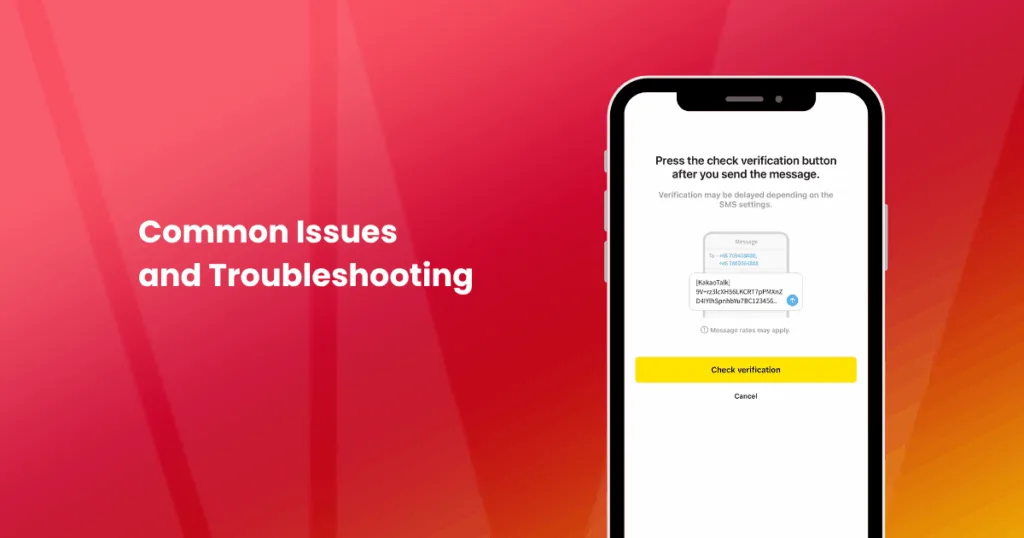
While a Kakao Account is designed to offer a seamless user experience, occasional issues may arise, especially for international users unfamiliar with the platform’s structure. From SMS verification errors to login trouble and sync problems, this section outlines common Kakao Account issues and how to troubleshoot them effectively so you can get back online without unnecessary delays.
Not Receiving SMS Verification Code
A frequent issue during sign-up or login is the failure to receive a verification code via SMS. This can be due to various factors:
Possible Causes:
- Using a phone number from a region not supported by Kakao
- Network delay or blocking by your carrier
- Entering the phone number in the wrong format (missing country code, etc.)
Solutions:
- Double-check that your phone number includes the correct international code (e.g., +1 for the US, +62 for Indonesia).
- Switch between mobile data and Wi-Fi to reset your network.
- If you’re using an online SMS service or VoIP number, try again with a physical SIM card.
- Wait a few minutes and request a new code; multiple rapid requests can cause temporary blocks.
“This Service Is Not Available in Your Country”
Kakao sometimes restricts access based on region or device language settings.
Solutions:
- Change your device language to English or Korean, as some features may not work correctly in other languages.
- Use a VPN to simulate a South Korean IP address, especially if you’re signing up from a country with limited Kakao service.
- If you still face restrictions, try creating your account through the Kakao website rather than the mobile app.
Trouble Logging In to KakaoTalk or Other Services
Users occasionally experience login failures, even when using the correct email and password.
Solutions:
- Make sure Caps Lock is off and the keyboard is set to the correct language.
- Try resetting your password using the “Forgot Password?” link.
- Clear your browser cache or app data, then retry.
- If logging in on a new device, verify that you’ve received and entered the correct authentication code sent via SMS.
By understanding these common problems and applying the recommended solutions, you can minimize downtime and enjoy a smoother experience across Kakao’s suite of services. If technical issues persist, Kakao’s official support team offers multilingual help for domestic and international users.
Kakao Account for Businesses and Developers

A Kakao Account isn’t just for messaging or socializing; it’s also a powerful tool for businesses and developers aiming to tap into South Korea’s digitally savvy population. Whether managing a brand presence, launching advertising campaigns, or integrating Kakao APIs into your apps or services, a verified Kakao Account is your entry point into Kakao’s robust suite of business and development tools.
Accessing Kakao Business Platform
With a Kakao Account, you can register for Kakao Business, the central hub for managing brand activities on Kakao platforms.
Key features include:
- Kakao Channel: Create and manage a brand profile to communicate with followers via KakaoTalk. This is useful for customer service, promotions, and content sharing.
- KakaoTalk Biz Message: Send targeted notifications and promotional messages to verified customers.
- Kakao i: Kakao’s AI and analytics tools that help businesses understand user behavior and improve customer engagement.
- Commerce tools: Sell directly through KakaoTalk Gift and other integrated shopping features.
A Kakao Account enables you to manage all these tools under one dashboard, making business operations more efficient and connected.
Advertising Through Kakao Ad Manager
Kakao’s Ad Manager (Kakao광고) allows businesses to run highly targeted ads across Kakao’s ecosystem, including:
- KakaoTalk
- Daum (search portal)
- KakaoStory
- Kakao TV
- Partner websites
You can:
- Set targeting parameters (location, age, interests, behavior)
- Monitor performance in real-time
- Optimize campaigns using built-in analytics
To access Kakao Ad Manager, simply log in with your Kakao Account and complete the advertiser verification process.
Using Kakao Developers for App Integration
For developers, a Kakao Account gives you access to Kakao Developers, an open platform offering APIs and SDKs for various services, including:
- Kakao Login (OAuth 2.0): Allow users to sign in to your app or website using their Kakao credentials.
- Kakao Talk API: Enable in-app messaging, content sharing, or sending automated messages.
- Kakao Map API: Integrate detailed maps and navigation features tailored for South Korea.
- KakaoPay API: Embed secure payment options into your platform.
Once your account is verified, you can register applications, manage tokens, and access full API documentation through the developer portal.
Business Verification and Compliance
To access certain features (e.g., KakaoTalk Biz Message, Ads, or API usage at scale), you’ll need to verify your business identity. This includes:
- Submitting a business registration certificate
- Providing contact and operational details
- Agreeing to Kakao’s terms for business services
Verification usually takes a few days and ensures that your account is eligible for advanced features and higher message volumes.
Global Businesses Are Welcome
Kakao has made efforts to accommodate foreign businesses and developers by offering multilingual documentation and customer support. If your business is targeting the Korean market or if you’re developing products meant to integrate with Kakao services, your Kakao Account will serve as your anchor for strategic growth.
Pro Tip: If you plan to run ads or manage a Kakao Channel in Korean, it’s best to work with a Korean-speaking partner or agency (like Inquivix) to maximize performance and compliance.
Make the Most of Your Kakao Account

Your Kakao Account is the gateway to Korea’s top digital platforms, KakaoTalk, KakaoPay, KakaoStory, and more. By setting it up properly and exploring its full features, you can enjoy seamless access, better personalization, and stronger security across all Kakao services.
No matter if you’re a casual user or a brand targeting Korean consumers, knowing how to maximize your Kakao Account gives you a clear advantage. Having a great knowledge and knowing how to use the Kakao Account is essential especially if you’re aiming to enter the South Korean market.
Inquivix is an expert in KakaoTalk marketing. Collaborating with us will help you navigate every step in advancing the Kakaotalk scene. Ready to grow your presence on Kakao? Partner with Inquivix and connect with Korea’s digital audience.